> For the complete documentation index, see [llms.txt](https://docs.nerovasystems.com/llms.txt). Markdown versions of documentation pages are available by appending `.md` to page URLs; this page is available as [Markdown](https://docs.nerovasystems.com/guides/zero-to-live/step-6-verify-capabilities.md).

# Step 6: Verify capabilities

Read the capability report Nerova builds by probing your implementation, and understand the fail-closed rule that governs everything downstream.

{% hint style="info" %}
Requires [Step 5: Connect your platform](/guides/zero-to-live/step-5-connect-platform.md).
{% endhint %}

**Step 6 of 10.** Your connection is Active. Before Nerova will exercise any operation against your implementation, it verifies what the connection can actually do. In this step you read the capability report and understand the fail closed rule that governs everything downstream.

## 6.1 Read the capability report

{% tabs %}
{% tab title="curl" %}

```bash
curl https://api.nerovasystems.com/api/v1/tenants/{tenantId}/capabilities \
  -H "Authorization: Bearer $NEROVA_API_KEY"
```

{% endtab %}

{% tab title="C#" %}

```csharp
// client construction: see the .NET SDK page (docs.nerovasystems.com/sdks/dotnet)
var tenantId = "1539251826400956416"; // from step 4
var report = await client.Api.V1.Tenants[tenantId].Capabilities.GetAsync();
Console.WriteLine($"availability: {report?.Availability}");
foreach (var node in report?.Providers ?? [])
{
    Console.WriteLine($"{node.Id} ({node.Readiness}): {string.Join(", ", node.Capabilities ?? [])}");
}
```

{% endtab %}

{% tab title="TypeScript" %}

```typescript
// client construction: see the TypeScript SDK page (docs.nerovasystems.com/sdks/typescript)
const tenantId = "1539251826400956416"; // from step 4
const report = await client.api.v1.tenants.byTenantId(tenantId).capabilities.get();
console.log(`availability: ${report?.availability}`);
for (const node of report?.providers ?? []) {
  console.log(`${node.id} (${node.readiness}): ${node.capabilities?.join(", ")}`);
}
```

{% endtab %}
{% endtabs %}

For a tenant connected to the reference provider sample the report looks like this:

```json
{
  "availability": "available",
  "observedAt": "2026-08-04T12:44:10+00:00",
  "providers": [
    {
      "id": "booking",
      "provider": "reference-provider",
      "contractVersion": "provider-api-v1",
      "featureStatus": "current",
      "readiness": "ready",
      "capabilities": [
        "ReadServices",
        "ReadAvailability",
        "CreateAppointments"
      ],
      "pausedDuties": []
    }
  ]
}
```

Each entry in `providers` is one capability node: the booking provider always appears, and after you bind a channel in step 8 a second node (`channel-whatsapp`) joins it with its own readiness. `pausedDuties` lists duties the mandate has set to `Never` once step 7.5 is done.

The full capability vocabulary matches the twelve operations from step 3: `ReadServices`, `ReadStaff`, `ReadSchedules`, `ReadClients`, `ReadAvailability`, `ReadAppointments`, `CreateAppointments`, `RescheduleAppointments`, `CancelAppointments`.

## 6.2 Declared, verified, unsupported

Three states matter for every capability:

* **Declared.** Your manifest (step 3) claims it. A claim alone does nothing.
* **Verified.** Nerova has exercised the operation against your endpoint and holds evidence it behaves. Only verified capabilities are ever used.
* **Unsupported.** Not declared, or declared and failed verification. The digital employee will not attempt it, and work that would need it is routed to a human instead.

This is the fail closed rule: absence of proof means no. It protects your merchants from an integration that claims more than it delivers, and it means an honest, small manifest is always better than an ambitious one.

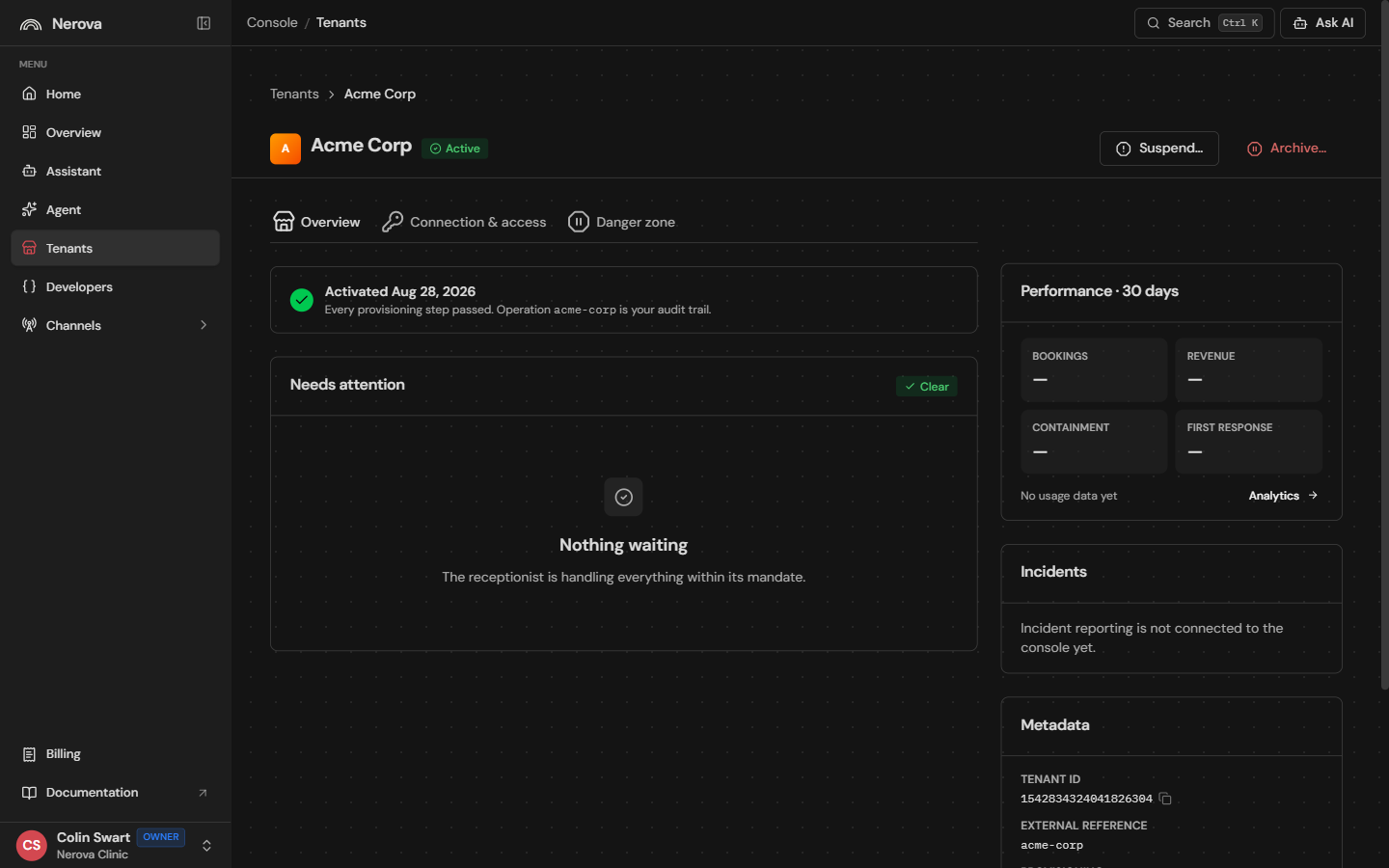
<figure><img src="https://688612263-files.gitbook.io/~/files/v0/b/gitbook-x-prod.appspot.com/o/spaces%2FFbXqEX8kMjYyctZN2zcq%2Fuploads%2Fgit-blob-a9efcda9d53e4c64eae0d8b6573107b3691a9a51%2Fconsole-tenant-detail.png?alt=media" alt="A tenant detail page in the console"><figcaption><p>The tenant detail page shows the same picture for one tenant: provisioning state, activation status, and the metadata you provided at creation.</p></figcaption></figure>

## 6.3 Certification

Verification of individual capabilities happens continuously. Certification is the formal, recorded conformance run across the whole contract that takes the connection's `certificationState` from `Unverified` to `Certified`. You will need a certified connection to go live (step 10); you can run conformance as often as you like while you iterate on your implementation. The conformance tooling names each check by the exact operation identity from the table in step 3, so failures map straight onto your code.

## 6.4 If a capability is missing

Work backwards through the layers, using the capability report at each point:

1. Does your manifest declare it? If not, that is by design.
2. Does the operation work when called directly against your endpoint?
3. Is the connection healthy (`health` on the connection from step 5)?
4. Re-read the report after fixing; verification picks up changes without manual intervention.

## Where you are now

Nerova now holds verified evidence of what your integration can do. The tenant is still not operating: no duties are mandated, no consents captured, no channel bound. Turning a connected tenant into an Active digital employee is the activation loop.

Continue to [Step 7: Run activation](/guides/zero-to-live/step-7-activation.md).


---

# Agent Instructions
This documentation is published with GitBook. GitBook is the documentation platform designed so that both humans and AI agents can read, navigate, and reason over technical content effectively. Learn more at gitbook.com.

## Querying This Documentation
If you need additional information that is not directly available in this page, you can query the documentation dynamically by asking a question.

Perform an HTTP GET request on the current page URL with the `ask` query parameter, and the optional `goal` query parameter:

```
GET https://docs.nerovasystems.com/guides/zero-to-live/step-6-verify-capabilities.md?ask=<question>&goal=<endgoal>
```

`ask` is the immediate question: it should be specific, self-contained, and written in natural language.
`goal` is optional and describes the broader end goal you are ultimately trying to accomplish on behalf of the user. GitBook uses it to tailor the answer towards what is most useful for that goal.

The response will contain a direct answer to the question and relevant excerpts and sources from the documentation.

Use this mechanism when the answer is not explicitly present in the current page, you need clarification or additional context, or you want to retrieve related documentation sections.
